Wear Sync for Breezy Ứng dụng
Wear Sync for Breezy A lightweight bridge application that syncs detailed weather data from the Breezy Weather Android app to your Wear OS watch.
What it does Breezy Weather is a fantastic open-source weather app, but it doesn't always have a native way to send its rich data to every Wear OS watch face or tile. This app acts as a "sync bridge":
- It reads weather data directly from Breezy Weather's internal database (using a secure Content Provider).
- It processes current conditions, detailed metrics (UV, Humidity, Wind, etc.), and forecasts.
- It pushes that data to your connected Wear OS device instantly.
Key Features
- Automatic Background Sync: Updates your watch every 45 minutes automatically. **Real-time Updates: Uses a Content Observer to detect when Breezy Weather refreshes its data and triggers an immediate sync to your watch.
- Detailed Metrics: Syncs more than just temperature:
- Current Temp & "Feels Like"
- Humidity, Pressure, UV Index, and Visibility
- Wind Speed and Direction
- Air Quality Index (AQI) and Dew Point
- Precipitation Probability (Rain Chance)
- Forecasts:
- 7-Day daily forecast (Highs/Lows/Icons).
- 6-Hour hourly forecast.
- Unit Support: Automatically detects and respects your preference for Celsius or Fahrenheit.
Installation & Setup
- Breezy Weather: Ensure you have Breezy Weather installed and configured on your phone.
- Permissions: When you first open this sync app, tap "Fetch & Sync". It will request permission to read data from Breezy Weather.
- Watch App: Ensure the companion app is installed on your Wear OS watch to receive and display the data.
- Optimization: For reliable background syncing, it is recommended to disable "Battery Optimization" for this app so Android doesn't kill the background sync service.
How it works
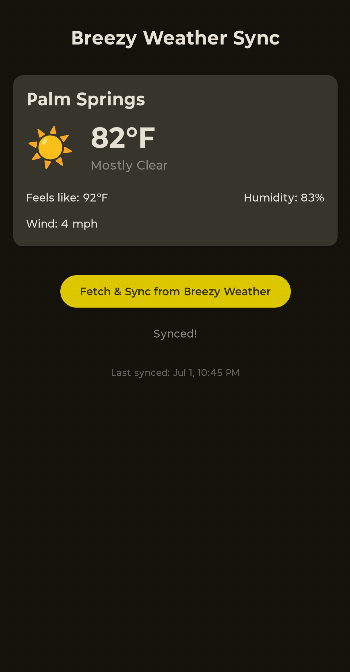
- The Phone App: Displays a preview of the data being synced and the "Last Synced" timestamp so you know your watch is up to date.
- The Service: Runs a START_STICKY background service that listens for system changes and handles the communication with Google Play Services Wearable API.
- Data Privacy: This app does not have internet access. It only reads data locally from one app on your phone and sends it locally to your own watch.
Requirements
- Android Phone with Breezy Weather installed.
- Wear OS Watch connected via Bluetooth/WiFi.
- Google Play Services.
Disclaimer: This is an independent companion app and is not officially affiliated with the main Breezy Weather development team.